
5G NAS Security Mode Command and Equipment Identity Check Explained Step-by-Step

5G NAS Security Mode Command and Equipment Identity Check: A Detailed Breakdown
In 5G Standalone (SA) networks, once we’ve authenticated the User Equipment (UE), the next big step involves setting up a secure NAS (Non-Access Stratum) communication channel and confirming the device's identity. This is where the NAS Security Mode Command and Equipment Identity Check come into play.
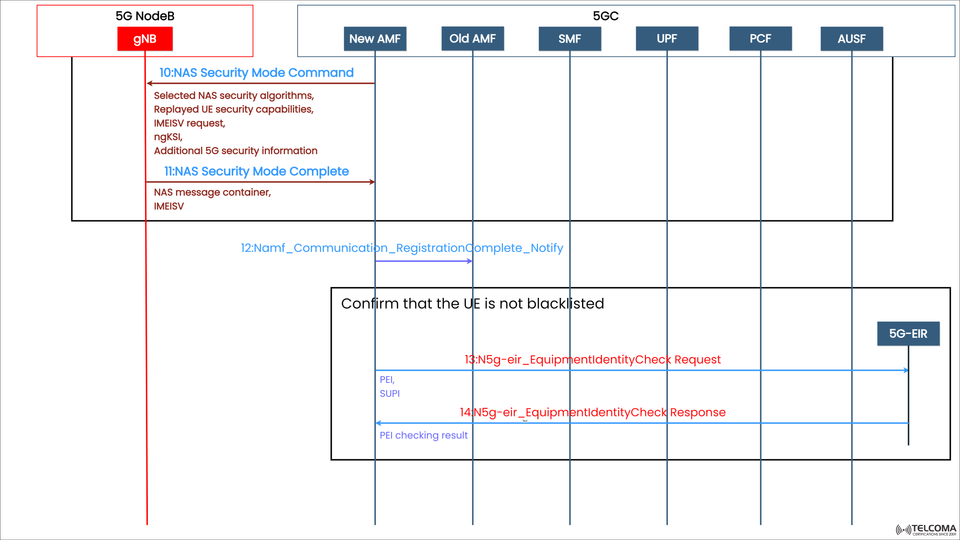
The image above shows this part of the 5G registration process, illustrating how the Access and Mobility Management Function (AMF), gNB, and Equipment Identity Register (EIR) work together to ensure a secure onboarding for the UE.
This guide walks you through each step, so you’ll get a clear picture of how security and device integrity are ensured before allowing full network access.
The Importance of NAS Security Mode Command in 5G
The NAS Security Mode Command (SMC) is crucial for setting up encryption and integrity protection for NAS signaling messages sent between the UE and the AMF.
After a successful NAS authentication, the UE and AMF have a shared set of security keys, but those keys aren't active yet. The Security Mode Command kicks things off by activating those keys and negotiating which algorithms will be used for secure communication.
Goals of the NAS Security Mode Command
Enable encryption and integrity protection for NAS messages.
Verify UE security capabilities.
Ensure a secure NAS communication between the UE and the AMF.
Request IMEISV to check the device identity later.
Without this step, later NAS signaling—like completing registration and setting up PDU sessions—would be left exposed and at risk of tampering or replay attacks.
Step-by-Step Process for 5G NAS Security Mode Command
Step 10: NAS Security Mode Command
Direction: AMF → UE (via gNB)
Once authentication is successful, the AMF kicks off the NAS Security Mode Command procedure. This command lets the UE know what security algorithms have been selected and activates NAS-level security.
Message Details:
Chosen NAS Security Algorithms – Indicates which encryption (NEA) and integrity (NIA) algorithms will be used.
UE Security Capabilities – Repeats the UE’s supported security algorithms from previous messages to avert downgrade attacks.
IMEISV Request – Asks for the International Mobile Equipment Identity and Software Version from the UE.
ngKSI (NAS Key Set Identifier) – Identifies the NAS security context that’s being activated.
Additional 5G Security Info – This might include parameters for deriving security keys or enhancements.
Purpose:
This step is all about agreeing mutually on which algorithms will secure NAS signaling. The replay of UE capabilities helps ensure that weaker security algorithms aren’t pushed by any bad actors.
Step 11: NAS Security Mode Complete
Direction: UE → AMF (via gNB)
Once the Security Mode Command is processed, the UE sends back a NAS Security Mode Complete message, confirming that the NAS security context is now active.
Message Details:
NAS Message Container – This can carry the next NAS message securely (like continuing registration).
IMEISV (International Mobile Equipment Identity and Software Version) – Provided if the AMF requested it.
Validating UE Identity and Equipment Authenticity
**Step 12: Namf
_Communication
_Registration Complete
_Notify**
Direction: AMF → Other Core Functions
After NAS security is successfully activated, the AMF notifies other network functions that the UE registration process has entered a secure phase. This notification sets off further verification steps, like the Equipment Identity Check and coordination of policy controls.
The focus now is to confirm that the connected device (UE) is genuine and not blacklisted for theft, tampering, or fraud.
Equipment Identity Check Procedure
Once the AMF has the IMEISV from the UE, it starts the Equipment Identity Check procedure by reaching out to the 5G Equipment Identity Register (EIR).
The EIR keeps track of three lists:
White List – Devices allowed to connect.
Grey List – Devices under watch (they can connect but are monitored).
Black List – Devices barred from accessing the network.
This check makes sure that only authorized, unmodified, and compliant devices can access the 5G Core Network.
**Step 13: N5g-eir
_Equipment Identity Check Request**
Direction: AMF → EIR
The AMF sends a Check Request message to the EIR that includes:
PEI (Permanent Equipment Identifier) – Derived from the UE’s IMEISV.
SUPI (Subscription Permanent Identifier) – Subscriber identity used for cross-verification.
Purpose:
To ensure that the UE’s equipment (device) hasn’t been reported lost, stolen, or blacklisted by any operator or regulatory authority.
**Step 14: N5g-eir
_Equipment Identity Check Response**
Direction: EIR → AMF
The EIR checks the provided PEI against its database and returns a PEI Checking Result:
“White-listed” – UE can proceed with registration.
“Grey-listed” – UE can connect but will be monitored.
“Black-listed” – UE’s registration is denied by the AMF.
This ensures that even if a valid SIM (USIM) is inserted into a stolen or tampered device, the network can refuse access based on equipment identity.
Security Improvements Introduced in This Phase
NAS Encryption & Integrity Protection: All following NAS messages are secured using the chosen algorithms.
Replay Attack Prevention: Replayed UE capabilities help prevent downgrading to weaker encryption methods.
Device Legitimacy Verification: EIR validation guarantees that only approved hardware accesses the network.
Fraud and Theft Prevention: Stops stolen or cloned devices from re-registering on 5G networks.
Network-Wide Consistency: EIR information is frequently shared across operators, establishing a global security framework.
Common Challenges in NAS Security Mode and EIR Procedures
Algorithm Mismatch: Happens when the UE reports unsupported security algorithms, usually due to misconfiguration.
IMEISV Transmission Failures: Some devices might not send IMEISV, causing registration delays or rejections.
EIR Connectivity Issues: If the EIR service is unreachable or misconfigured, the AMF can’t verify equipment.
Blacklist False Positives: Incorrect or outdated EIR entries might reject legitimate devices; regular synchronization is needed.
Real-World Example of Network Operation
When a UE tries to register:
The AMF sends a Security Mode Command with selected NEA2/NIA2 algorithms.
The UE responds with Security Mode Complete, confirming security activation and providing IMEISV.
The AMF checks with the EIR using the PEI to determine blacklist status.
The EIR answers “White-listed,” allowing registration to proceed securely.
This process ensures both subscriber authentication and device validation—critical for maintaining trust and reliable networking in 5G.
Conclusion
The NAS Security Mode Command and Equipment Identity Check procedures form the backbone of the 5G Standalone Registration process. Together, they ensure that:
Communication between the UE and AMF is fully secured.
Only legitimate, non-blacklisted devices gain access to the network.
By establishing mutual trust, activating encryption, and verifying equipment validity, these steps strengthen 5G against fraud, spoofing, and device cloning, creating a safe, resilient, and future-ready mobile ecosystem.