
Cisco SD-WAN OnRamp: Simplifying Cloud and SaaS Connectivity for Branches

🚀 Getting Started with Cisco SD-WAN OnRamp
In this hybrid multi-cloud century we are experiencing, enterprise users want seamless access to cloud services, whether that be SaaS applications such as Microsoft 365 or workloads they are hosting in AWS or Azure. Cisco SD-WAN OnRamp is our way of providing intelligent, optimized, secure connectivity to the cloud from any branch or campus.
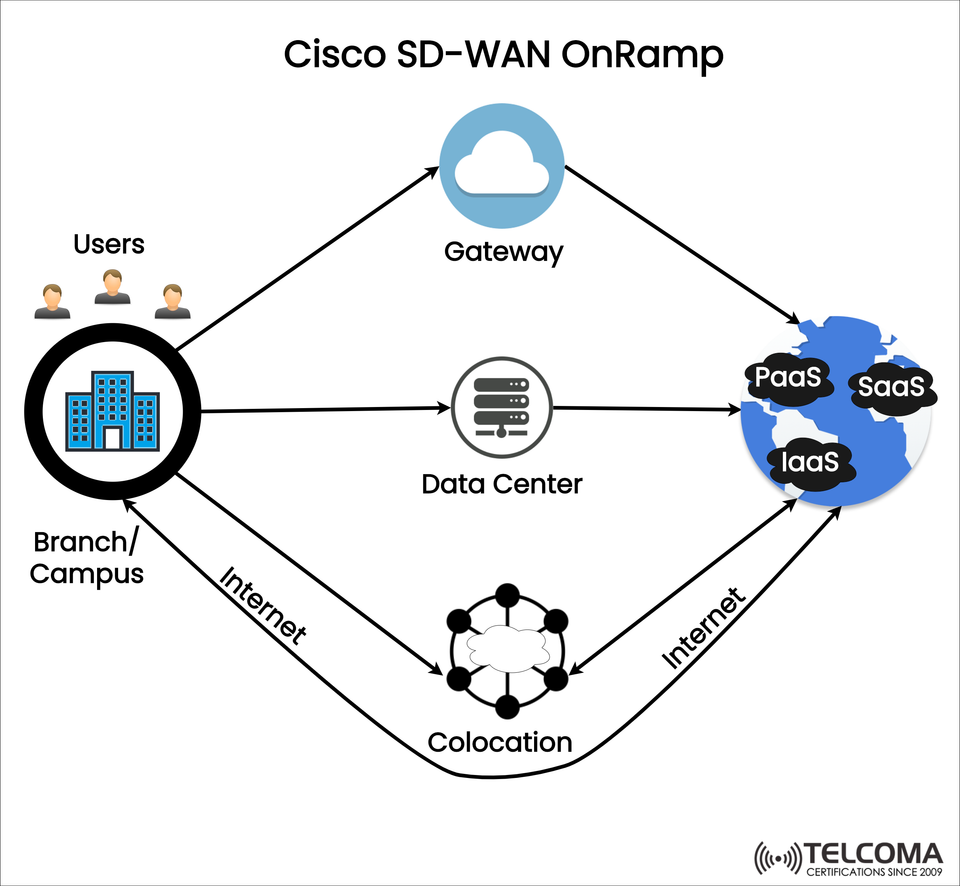
The diagram above represents how SD-WAN OnRamp will can dynamically select either the internet, the given data center, or a cloud gateway thereby executing SD-WAN OnRamp's goal of actively delivering applications reliably and securely.
🧠 What is Cisco SD-WAN OnRamp?
Cisco SD-WAN OnRamp is a collection of features in the SD-WAN solution for improving user experience with cloud applications. The features are based on telemetry, SLA policies, and performance based routing.
It is primarily used to:
Improve performance of cloud applications
Improve direct internet access (DIA) with security
Optimize routing to SaaS, IaaS, and PaaS platforms
Implement automated path selection with real-time metrics
🌐 Learning the architecture (image breakdown)
Key components from the diagram:
Component Function
Branch/Campus Location the user is initiating traffic
Gateway Cloud based onramp gateway that optimizes performance
Data Center Central routing point for a legacy, or internal apps
Colocation Peer point for all the major cloud providers IaaS
Traffic from a branch can take several paths depending on:
Application Type (SaaS vs. Legacy App)
Performance Metrics (Jitter, Latency, Packet Loss)
SLA Policies defined
☁️ Application Flows Supported by OnRamp
To SaaS: Cisco monitors app performance via many gateways and selects the best path
To IaaS/PaaS: Traffic is routed overCloud onramps, colocation sites, or directly using the internet.
To Data Centers: Traffic is routed on a high-performance controlled fabric with centralized policies.
🧩 Features and Benefits of Cisco SD-WAN OnRamp
✅ Application-Aware Path Selection
Automatically selects the best path based on application telemetry.
Supports SLA-based routing so the performance is guaranteed by the SLA.
✅ Cloud OnRamp for SaaS
Provides real-time metrics for SaaS destination.
Reroutes traffic to the gateway with the best performance or
to a direct-to-cloud path.
✅Cloud OnRamp for IaaS
Integrate with AWS, Azure, GCP through cloud edge connectors.
Provide automated connectivity setup with cloud-native VNFs.
✅ Further Security Posture
Enterprise grade security with a colocation policy and a DIA policy.
Provide segmentation and zoned-based firewall policies.
🏗️ Deployment Scenarios and Use Cases
Use Case Description
Remote Branch Access to Microsoft 365 Cisco OnRamp selected the fastest DIA path via a gateway and/or directly to the Microsoft cloud.
Hybrid Cloud Workloads Appropriately routes some traffic to the on-prem data.
✅ Summary: Why Cisco SD-WAN OnRamp?
Cisco SD-WAN OnRamp brings together telemetry, analytics, and intelligent routing to enable consistent, high-performance access to cloud-based applications. It reduces latency, increases reliability, and improves user experiences across all SaaS, IaaS, and PaaS services.
Key Takeaways:
Direct, intelligent access to cloud and Internet resources
Flexibility and extensibility that fits existing SD-WAN and security policies
Cloud-first architecture provides features for distributed enterprises
📘 Conclusion
In the world of cloud-focused networking, Cisco SD-WAN OnRamp is the future. Whether you are delivering Salesforce to a branch user or connecting a regional office to an Azure-hosted VM, OnRamp ensures that your traffic is always secure, optimized, and intelligently routed, time and time again.
Be sure to follow our next post on how to configure OnRamp in Cisco vManage and tie Cloud Security Umbrella (CSU) and ThousandEyes (TE) clouds together for full-stack visibility.
🔧 Best Practices for Deploying Cisco SD-WAN OnRamp
The successful deployment of Cisco SD-WAN OnRamp takes some design planning and security integration, as well as ongoing monitoring. To ensure you and your organization (or your customers/partners) have a successful rollout, here are some best practices:
📌 Design Tips:
Segment your application traffic. Tag and classify your traffic types such as SaaS, IaaS, and legacy to apply different policies.
🔐 Security Considerations:
Use Secure Internet Gateways (SIGs) such as Cisco Umbrella for DNS-layer security.
Use IPSec encryption between branches and gateways to provide data integrity and privacy.
Use ZBF (Zone-Based Firewall) rules that restrict lateral movement of threats across segments.
📊 Monitoring and Analytics:
Use vAnalytics to continuously measure application performance across all paths.
Enable SLA monitoring for critical applications (e.g. Salesforce, Microsoft 365, and Zoom).
(Optional) Consider using ThousandEyes for deeper visibility into performance for Internet and SaaS.
🛠️ Implementation Considerations
Step Description
- Define Traffic Classes Classify traffic for SaaS, IaaS, Internet and internal Apps with application-aware routing.
- Configure DIA and SIG Policies Set up Direct Internet Access and secure Internet Gateway (Umbrella).
- Enable OnRamp for SaaS/IaaS Use Cisco vManage GUI or API to turn on OnRamp policies for cloud compute services.
- Monitor and Adjust Continuously measure performance using telemetry, and make dynamic path adjustments.
🧭 Final Thoughts
Cisco SD-WAN OnRamp brings intelligence and approximate WAN connectivity, by unifying users on and off-sitting users, core compute services via public cloud platforms. Features such as performance-based routing, secure Internet access from cloud, and native cloud integration, provide your enterprise with the intelligence benefit of cloud-first strategies to leverage the right technology at the right time.