
Comparing 6 GHz vs 5 GHz vs 2.4 GHz Wi-Fi Bands: Channel Widths, Spectrum & Capacity Explained
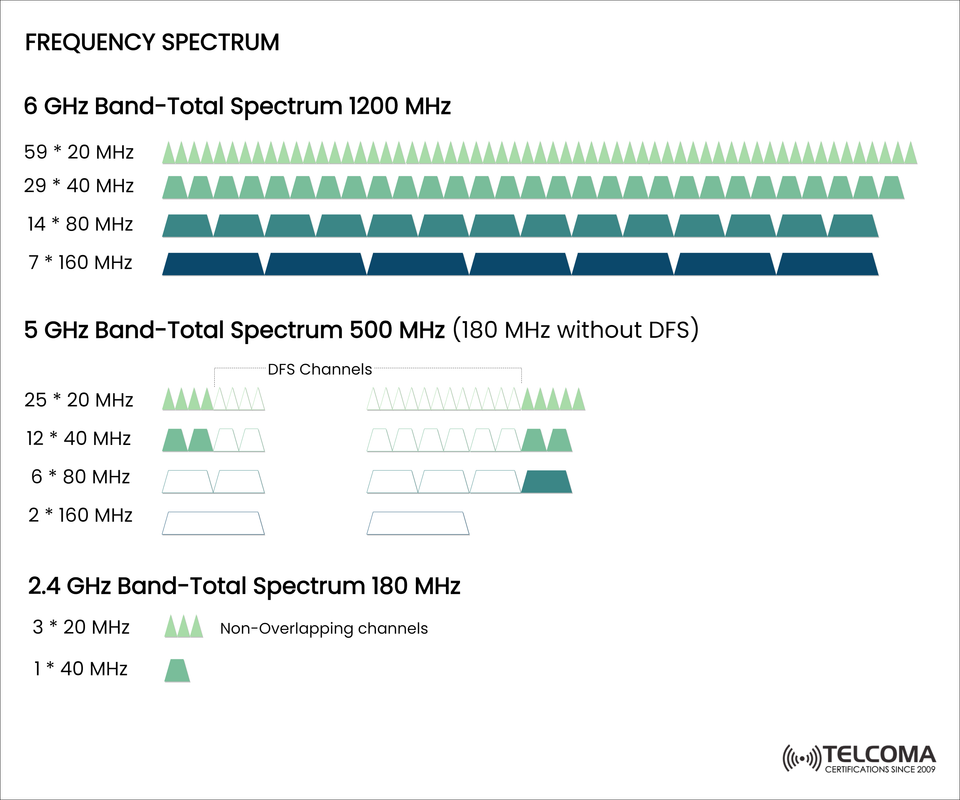

📶 Explanation of Wi-Fi Frequency Bands: 6 GHz vs 5 GHz vs 2.4 GHz As wireless networks continue to evolve it is important to make sense of available frequency spectrum and channel width to facilitate higher throughput rates, lower interference and use of technology types such as Wi-Fi 6E and Wi-Fi 7.
The image above shows the way the current bandwidth is split up between the three main unlicensed Wi-Fi bands. Below is a summary.
📊 Spectrum Summary:
Side-by-Side Comparison Feature 6 GHz Band 5 GHz Band 2.4 GHz Band Total Spectrum 1200 MHz 500 MHz (180 MHz w/o DFS) 180 MHz Max Channel Width 160 MHz 160 MHz 40 MHz # of 20 MHz Channels 59 25 3 # of 40 MHz Channels 29 12 1 # of 80 MHz Channels 14 6 0 # of 160 MHz Channels 7 2 0 DFS Requirement No Yes (Partial) No
🌐 6 GHz Band – The Next Era of Wi-Fi Key Takeaways: Abundant 1200 MHz of spectrum
No DFS delays
Up to 7 non-overlapping 160 MHz channels — a must for Wi-Fi 6E/7
Ideal for ultra-low-latency or high-throughput applications (e.g. AR/VR, 8K streaming)
Benefits: Cleaner airwaves with less interference
More capacity in 'cafeteria' environments
More spectrum flexibility in Multi-AP innate
⚠️ 5 GHz Band – Still Plenty of Power, but Less Flexibility Key Takeaways: 500 MHz total (but only 180 MHz usable without DFS)
Contains DFS channels that can be inhibited by radar systems
Use Cases:
Suits for general purpose Wi-Fi 5 and Wi-Fi 6 devices.
Commonly in enterprise APs that throttle DFS awareness.
🏡 2.4 GHz Band
Characteristics:
Only 180 MHz total, with only 3 non-overlapping 20 MHz channels.
Very congested due to the massive overgrowth of IoT devices, Bluetooth, microwaves, etc.
Lower data rates, better for range and wall penetration.
Typical applications:
IoT sensors, smart home gadgets, ancient Wi-Fi clients.
🧠 What is DFS and Why Does it Matter?
DFS (Dynamic Frequency Selection) is solely created so that you do not cause interference with radar systems on the 5 GHz band and is regulated. DFS is needed, because it;
Can cause a delay on channel scanning
Can disconnect any clients that are currently connected if radar is detected
Will cause a less reliable channel for time sensitive applications.
The DFS free 6 GHz band is a large advancement for low latency and ultra-speed wireless technologies because you will no longer have to consider radar or the reliance of radar to use the channel.
🏁 Conclusion: Selecting the Right Band for the Right Task
While the 6, 5, & 2.4GHz bands serve different purposes:
6 GHz: Preferable for Wi-Fi 6E, new technology with fast speed, and no interference from older technology.
5 GHz: Typically reliable and will connect with different Wi-Fi 5 or Wi-Fi 6 devices or different clients, although would encounter DFS requirements.
2.4 GHz: Helps with coverage and having the best support for IoT devices, but it does have a low throughput and it has more interference.
Understanding these band distinctions will allow better network planning, AP selection, and QoS configuration.
📡 How to Use Each Band in Your Deployments: Deployment Strategies
For broadband and wireless professionals, ensuring spectrum efficiency is not simply a best practice, but it is mission-critical. Here’s how to design smarter networks and utilize each band in Wi-Fi:
📍 6 GHz: Deployment Context and Considerations
Deployment Context: Stadiums, auditoriums, smart factories, AR and VR environments
Access Points: Only Wi-Fi 6E or Wi-Fi 7 certified access points will transmit in the 6 GHz band.
Client Devices: Ensure that your clients device has a compatible chipset, (for example, first generation 6E chips were installed on smartphones and laptops made after 2021)
Channel Planning: Plan to use 160 MHz or 80 MHz channels whenever possible to maximize throughput.
📍 5 GHz: Deployment Context and Considerations
Deployment Use Case: High density enterprise Wi-Fi (for example, schools, hotels, offices)
Mitigation of DFS:
Configure APs for DFS with fallback channels
Employ static channel planning to avoid interference through overlap.
Channel Width Preference: Wide 40 MHz to 80 MHz to stabilize throughout and speed
📍 2.4 GHz: Deployment Context and Considerations
Best for: Low bandwidth use cases, IoT sensors, and legacy client deployments
Channel Plan:
Only use channel 1, channel 6, and channel 11 to avoid overlapping interfering channels
Reduce transmit power to limit cross interfering channels.
Caution in Security: Many of the IoT devices issued for a long time using WPA protocols are still not updated. Do not use IoT devices in the Enterprise that have outdated security types.
🌍 Global Regulatory Perspective: What is approved where?
Region 6 GHz Band Allocation Notes
USA (FCC) Full 1200 MHz Indoors, low power indoors, and low power outdoors
EU (CEPT) 500 MHz only lower 6 GHz (5.925 – 6.425 GHz)
🔮 Takeaways: Wi-Fi 7 (and Beyond)
Wi-Fi 7 (802.11be) is expected to become commercially available by 2025 and will significantly improve throughput and latency by using:
320 MHz channels in the 6 GHz band
Multi-Link Operation (MLO) across different bands
4096-QAM modulation
Improved MU-MIMO and beamforming
These options require vast contiguous spectrum and clearly highlight the value of a 6 GHz band.
🧩 Summary: Implications for Network Designers
In current enterprise and residential networks:
✅ 6 GHz is the new high performance wireless
✅ 5 GHz continues to be the reliable workhorse
✅ 2.4 GHz is there to support legacy and IOT devices
Keeping these factors in mind will allow for:
Better quality of experience (QoE)
Less latency for real-time apps
Future-proof networks
💼 Final Thoughts: Start Designing for Tomorrow Today
The evolution of Wi-Fi is not simply about speed, it is also about reliability, security, and growth. In a world where spectrum is becoming so valuable, the designers that understand the multi-layered channel plan, the issues surrounding DFS, and the capabilities of each band will usher in the next wave of wireless innovation.