
Understanding Near-Real-Time RIC and E2 Node Interaction in O-RAN Architecture

Getting a Grip on Near-Real-Time RIC and E2 Node Interaction in O-RAN Architecture
The Open Radio Access Network (O-RAN) system is really changing the game for telecom operators in how they design, manage, and optimize their networks. It’s all about open interfaces, smart controls, and real-time automation, which together make mobile networks more adaptable, affordable, and open to different vendors.
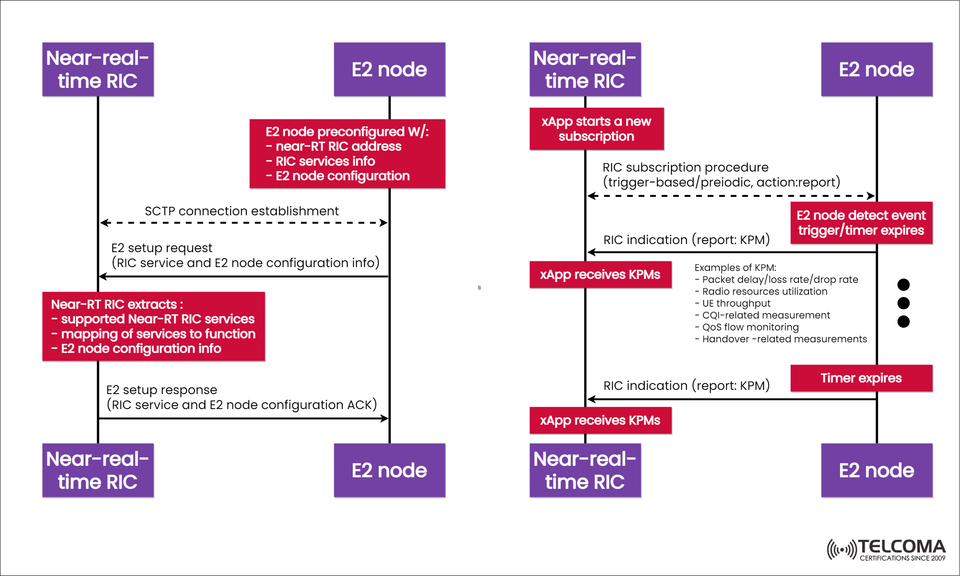
At the heart of this smart and flexible setup is the Near-Real-Time RAN Intelligent Controller (Near-RT RIC). It connects with E2 Nodes (like O-DU, O-CU, or O-eNB) through the E2 interface. The diagram we’ve included shows how this interaction between the Near-RT RIC and E2 Nodes works, focusing on setup, subscriptions, and KPI reporting processes.
In this post, we’ll unpack the workflow of how the Near-RT RIC powers network intelligence and allows xApps to optimize things in real-time within the O-RAN ecosystem.
What Near-Real-Time RIC Does in O-RAN
The Near-RT RIC functions within a 10 ms to 1-second control loop, managing tasks like:
Optimizing radio resources
Enforcing policies
Balancing loads
Managing interference
Controlling QoS (Quality of Service)
This setup allows xApps (RIC applications) to analyze network data and automatically take actions in near-real time. These xApps connect to data streams from E2 Nodes, process Key Performance Metrics (KPMs), and issue control commands as needed.
E2 Node: Your Data and Control Hub
An E2 Node can be:
An O-eNB (Evolved Node B) in 4G, or
An O-DU (Distributed Unit) and O-CU (Central Unit) in the 5G architecture.
E2 Nodes handle radio transmissions, user scheduling, and MAC-layer tasks. They serve as data sources for the RIC and also act as execution points for the optimization policies from xApps.
Before the RIC can take control of an E2 Node, that node needs to connect and be set up to communicate through the E2 interface, which uses SCTP (Stream Control Transmission Protocol) over IP.
Breaking Down: How Near-RT RIC and E2 Node Work Together
The diagram we provided illustrates two main workflows:
E2 Setup Procedure
RIC Subscription and KPM Reporting
Let’s dive into these steps.
A. E2 Setup Procedure
The setup phase is all about ensuring secure communication between the Near-RT RIC and the E2 Node. This process includes making an SCTP connection, exchanging configuration details, and mapping supported services.
Step 3: E2 Setup Request
The E2 Node sends an E2 Setup Request, including:
The list of RIC services
Configuration info for the node
Supported E2AP (E2 Application Protocol) functions
Step 4: RIC Extracts and Maps Information
The Near-RT RIC gets the request and pulls out:
The supported Near-RT RIC services
The function mapping of services
The configuration details from the node
This step helps the RIC sync its internal setup with what the E2 Node can do.
Step 5: E2 Setup Response
The RIC replies with an E2 Setup Response (ACK), which confirms that everything’s configured correctly and that they’re ready to start interacting at the service level.
At this point, the E2 Node and RIC are logically linked and good to go for xApp-based control and monitoring.
B. RIC Subscription and KPI Reporting
Once the setup is done, the xApps on the Near-RT RIC start subscribing to particular metrics or events from the E2 Nodes. This is where real-time network intelligence really comes into play.
Step 1: Subscription Initiation
An xApp within the Near-RT RIC kicks off a new subscription through the RIC Subscription Procedure.
This request specifies the type of trigger (either event-based or periodic)
The type of action (usually a report)
This lets the E2 Node know what kind of data the RIC is looking for and how often it’s needed.
Step 2: Event Trigger at E2 Node
The E2 Node keeps an eye on network conditions. When a trigger condition happens (like a timer going off or crossing a performance threshold), it will generate a report.
Some examples of Key Performance Metrics (KPMs) are:
Packet delay, loss rate, or drop rate
Radio resource usage
UE throughput
CQI (Channel Quality Indicator) measurements
QoS flow monitoring
Measurements related to handovers
Step 3: KPM Reporting
The E2 Node sends RIC Indication Messages that carry KPMs to the Near-RT RIC.
Step 4: xApp Receives and Processes KPMs
The xApp takes in the KPMs from the RIC and processes them to:
Identify any network issues
Optimize radio settings
Trigger control actions (like adjusting power levels or scheduling)
This process keeps going as long as the subscription is active.
Step 5: Subscription Timer Expiry
When the timer runs out, the E2 Node stops reporting unless the xApp decides to renew the subscription.
The Significance of Near-RT RIC and E2 Node Interaction
The connection between the Near-RT RIC and E2 Node is crucial for closed-loop automation in O-RAN networks. It leads to:
Dynamic radio optimization based on real-time data
Vendor interoperability thanks to open E2 interfaces
Programmable control using xApps
Operational efficiency by eliminating the need for manual tuning
This setup helps telecom operators create self-optimizing networks (SONs) that are way more efficient and responsive.
Quick Overview of Message Flow
Stage | Message / Action | Direction | Purpose
E2 Setup | E2 Setup Request | E2 Node → RIC | Share node and service configuration
E2 Setup | E2 Setup Response | RIC → E2 Node | Confirm setup and acknowledge config
Subscription | RIC Subscription | xApp → E2 Node | Define KPM triggers and actions
Reporting | RIC Indication | E2 Node → RIC | Send periodic or event-based KPIs
Control | RIC Control (Optional) | RIC → E2 Node | Apply optimization policies
The Bigger Picture: E2 Interface in O-RAN
The E2 interface sets the standards for communication between the Near-RT RIC and RAN elements, as defined by the O-RAN Alliance. It allows for:
E2AP (E2 Application Protocol) for control and monitoring messages
Service Models (E2SMs) that establish data formats for specific tasks like KPM, RRC, and handovers
This interface lets different vendors’ RAN components collaborate within a cohesive intelligent control system.
Conclusion
The interaction between the Near-Real-Time RIC and E2 Nodes is the core of O-RAN’s intelligent control framework. By sharing setup, subscription, and performance data over the E2 interface, operators gain unmatched visibility and control over their networks.