
Unlocking the Power of Cisco vManage: Orchestration and Security for Modern WANs

Cisco vManage: A Comprehensive SD-WAN Orchestrator and Security Platform
Worldwide, organizations employing cloud-first strategies, hybrid working strategies, and distributed networks require a single application for managing and securing WAN infrastructure. Cisco vManage is the complete package to easily orchestrate, improve visibility, and leverage enterprise-grade security across your entire network environment.
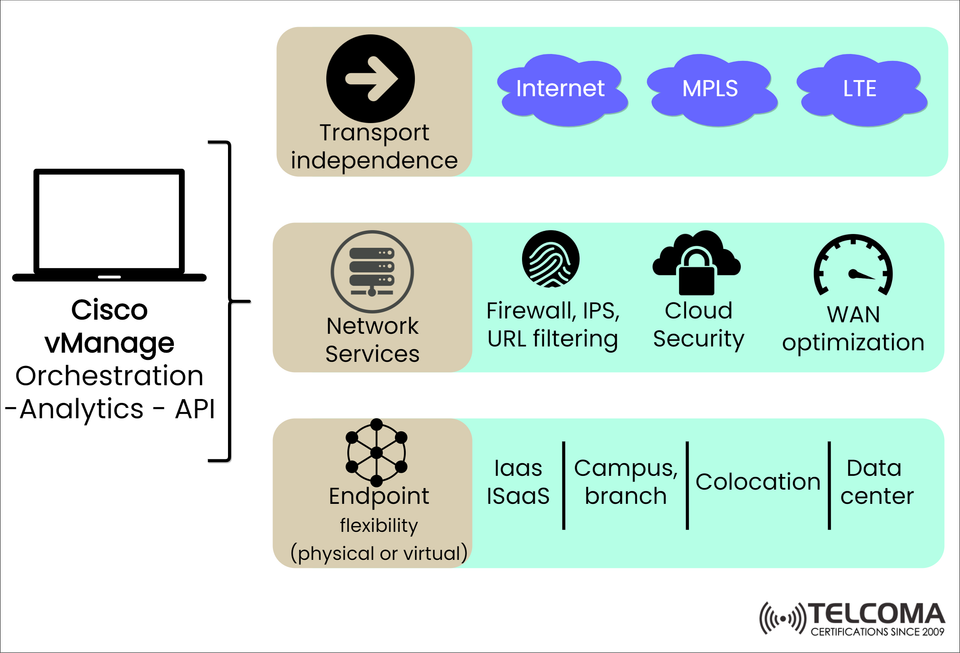
The diagram from Telcoma shows Cisco vManage's strategic position to manage SD-WAN operations through transport independence and network services and endpoints.
What is Cisco vManage?
Cisco vManage is the centralized controller of Cisco's SD-WAN architecture. Providing:
Orchestration: Unite configuration, provisioning and policy
Analytics: Real time monitoring, telemetry, and visibility
API Integration: Open APIs for automation and third-party tools
Cisco vManage enables network operators to scale, secure, and manage WAN environments in data centers, campus, and cloud.
The Key Pillars of Cisco vManage Architecture
In the figure, there are three pillars upon which Cisco vManage operates.
🛣️ 1. Transport Independence
Cisco vManage supports many types of WAN transport to allow seamless, policy-driven routing regardless of medium.
Transport types supported include:
🌐 Internet
🛣️ MPLS
📶 LTE/5G
Benefits:
Path diversity for redundancy
Cost savings through broadband/LTE
Rapid service delivery to sites
🔒 2. Network Services Built-In
vManage has built-in security and optimization capabilities, so you don't need to bolt solutions onto the work you've already done.
Feature Description
Firewall, IPS, URL Filtering Prevents users and applications from known threats
Cloud Security Protects data moving from on-prem to cloud
WAN Optimization Improves application performance and reduces latency
This also offers the ability to enforce consistent policies regardless of user location or access type.
🧩 3. Endpoint Flexibility (Physical or Virtual)
With Cisco vManage you can accommodate many endpoint types, ensuring seamless connectivity for:
🖥️ IaaS / ISaaS workloads
🏢 Campus and branch offices
🏬 Colocation facilities
🏛️ Enterprise data centers
Key Benefits include:
Supports physical and virtual appliances
Supports cloud-native or on-prem deployments
Perfect for Hybrid and Multi-Cloud strategies
Why Telecom Professionals Trust Cisco vManage
For telecom operators who offer managed SD-WAN or enterprise IT teams deploying at scale, Cisco vManage provides:
✅ End-to-end visibility
✅ Single-pane-of-glass orchestration
✅ Always consistent security posture at all edges
✅ Open API integrations for automation
✅ Ability to do policy-based routing and segmentation
Quick Comparison: Traditional WAN vs. Cisco SD-WAN with vManage
Feature Traditional WAN Cisco SD-WAN with vManage
Orchestration Manual, device-by-device Centralized and policy-driven
Transport Flexibility MPLS-heavy Supports internet, MPLS, LTE
First Steps with Cisco vManage
If you are ready to begin your WAN transformation journey, here is a simple pathway:
Assess your current transport infrastructure (MPLS, broadband, LTE)
Map your critical endpoints (IaaS, campuses, branches, etc.)
Assess your policy requirements for segmentation, security, and QoS.
Deploy your Cisco SD-WAN devices and onboard them via vManage.
Consistently analyze the environment for optimization and compliance.
Wrap-Up: Modern WAN Is About Smart Orchestration
Cisco vManage delivers a next-generation SD-WAN strategy which is transport-agnostic, security-driven, and flexible.
Anyone engaged in the delivery of telecommunications or enterprise services must consider these capabilities in transforming how they:
Manage connectivity
Apply security
Execute service rollout across the globe
As networks continue to develop complexity, tools like Cisco vManage will continue to allow the management of complexity while optimizing security and performance.
SEO Keyword List for Use
Please incorporate naturally throughout your content the following keywords to establish high-impact SEO:
Cisco vManage SD-WAN
SD-WAN orchestration platform
Cisco SD-WAN management
Transport-independent networking
WAN optimization Cisco
Cisco SD-WAN cloud security
Network services orchestration
SD-WAN hierarchical endpoint flexibility
Cisco WAN architecture
Telcoma SD-WAN training
Ready-Made Social Media Captions
These captions are ready to use for each platform.
🔹 Twitter (X):
🔄 Transport independence
🔐 Built-in security
🖥️ Cloud-ready endpoints
Get to know Cisco vManage - your SD-WAN control center. #SDWAN #Cisco #Telcoma
🔹 Facebook:
Cisco vManage provides centralized WAN orchestration with full visibility, just-in-time analytics and embedded security. Make your network secure and simple today. #CiscoSDWAN #Networking
🔹 Instagram (Visual + Hashtag heavy):
💻 Centralize your network.
🚀 Scale with security.
🔒 Orchestrate everything.
Introducing Cisco vManage!
TechSimplified #CiscovManage #SDWAN #CloudSecurity #NetworkOps
✅Summary Deployment Checklist
Format Use Case Recommendation
📄 PDF Whitepaper Marketing & Lead Gen Add cover and CTAs
🖥️ HTML/Markdown Blog or Knowledge Base Responsive layout
📊 PowerPoint Internal/Client Presentations Visuals and bullet points
🧾 DOCX Internal Teams Editable (to create SOPs or create training)
🧑🏫 Infographic Web and Social Sharing Condense architecture and display visually
🧩 Final Content Delivery Plan: Multi-Channel Plan
Outlined below is a proposed strategy on how to make the most of this blog post using several platforms and for various audience types.
📘 1. Website or Blog Publication
Where: Company blog, product page, or technical insights section
Format: HTML or Markdown
SEO Tips:
- Use H1-H3 tags for headings
- Embed the featured image (from the infographic)
- Use the provided title and description to set meta tags
📧 2. Email Campaign
Use Case: Re-engagement or education sequence for current customers or leads
Format: Newsletter or HTML email
Subject Line: "Unlock Cloud-Ready WAN: Cisco vManage simplified"
Body Summary: Use blog excerpt and CTA button to “Read the Full Article”
CTA: Link to blog or PDF download
📱 3. Social Media Push (One Week Plan)
Day Platform Content Type Caption Snippet
Mon LinkedIn Share blog article "Orchestrate and secure your WAN—anywhere. Check out Cisco vManage."
Tue Instagram Image + Hashtag "🔒 Built-in SD-WAN security. 💻 Centralized management. #CiscoSDWAN"
Wed Twitter Thread "Let's talk Cisco vManage 👇 a thread on WAN orchestration, security & scale..."
Thu Facebook Share article "Simplify your WAN operations with cloud-ready tools from Cisco."
Fri LinkedIn Slide Carousel "Cisco vManage: 3 pillars to modernize WAN" (Slides: Transport / Security / Endpoint)
🧾 4. Internal Enablement Materials
📄 PDF Whitepaper – for use in presales, onboarding, or analyst relations
📊 PowerPoint slides – quick wins for use in internal enablement or for client meetings
📘 DOCX File – editable version for SOPs, internal training, or knowledge base
🧠 Infographic – visual asset to educate stakeholders or promote webinars
🧠 Content that aligns with the business goals