
Wi-Fi Frequency Spectrum Explained: 6 GHz vs 5 GHz vs 2.4 GHz Bands for Modern Wireless Networks
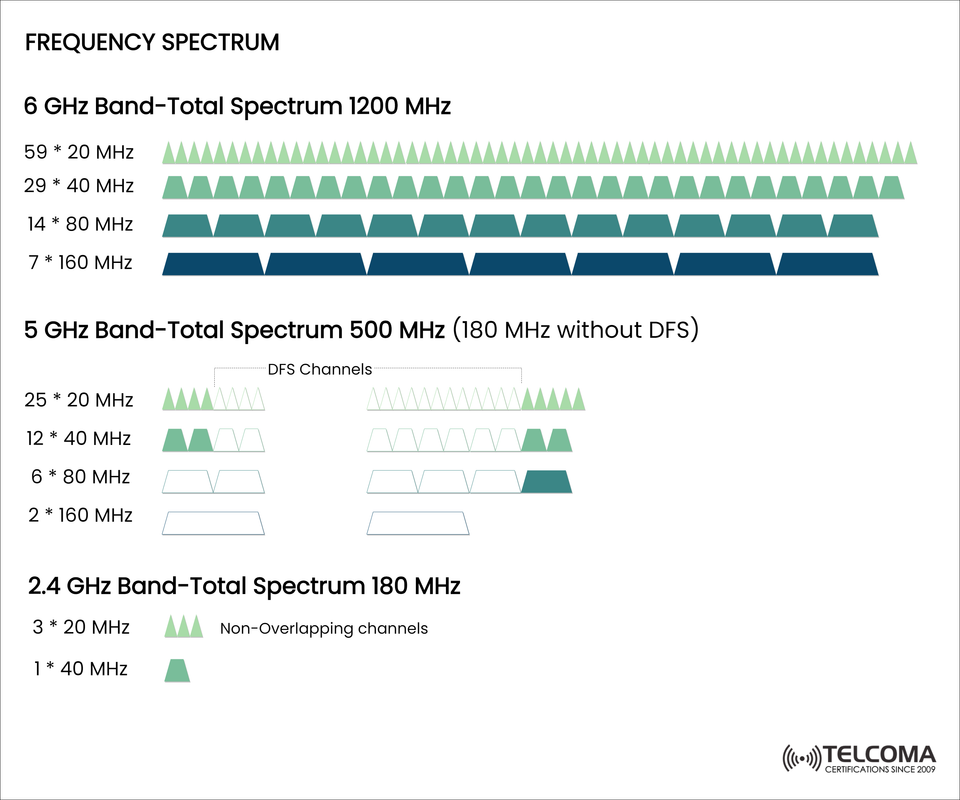

Wi-Fi Bands - The 6 GHz, 5 GHz, and 2.4 GHz Frequency Spectrum.
It’s the frequency spectrum that determines speed, coverage, and reliability when it comes to Wi-Fi. The evolution of Wi-Fi, including now the potential availability of 6 GHz frequency, has transformed how we communicate wirelessly for high-throughput and low-latency use cases. The following is a visual interpretation of the significant differences of the 6 GHz, 5 GHz, and 2.4 GHz Wi-Fi frequency bands, along with some technical information which is primarily geared towards telecom professionals, early adaptors, and technology enthusiasts.
📡 The Wi-Fi bands overview.
The wireless spectrum used in Wi-Fi is divided into three primary frequency bands:
2.4 GHz: The 2.4 GHz band is the most widely used; it provides good coverage, low speeds, area congestion due to fewer channels and interference from Wi-Fi.
5 GHz: The 5 GHz band has more channels while providing faster speeds, but the range is shorter than that of the 2.4 GHz band.
6 GHz: The 6 GHz band is the newest band with Wi-Fi 6E; it can provide ultra-fast speeds at the highest performance category in the largest spectrum; and would be ideally situated in a density and high-end performance environment.
🔍 6 GHz Band - Plenty of Capacity and Performance
Total Spectrum: 1200 MHz
Available Channels:
59 × 20 MHz
29 × 40 MHz
14 × 80 MHz
7 × 160 MHz
✅ Key benefits:
Ninety operating channels with an clean and interference free band (no legacy devices)
Ideal environment for AR/VR and very high density use cases
Channels can support wider channel bandwidths which provide multi-gigabit speeds
Possible applications: enterprise Wi-Fi/wireless, 4K/8K and AR/VR streaming.
⚠️ 5 GHz Band: Finding the right balance between speed and range
Total of Spectrum: 500 MHz (180 MHz without DFS)
Available Channels:
25 x 20 MHz
12 x 40 MHz
6 x 80 MHz
2 x 160 MHz
🚨 DFS (Dynamic Frequency Selection):
Some 5 GHz channels overlap with radar and require DFS in order to avoid interference.
If radar is detected there can be delays in channel availability, which may cause issues with overall network performance.
⚖️ Advantages:
It is not as congested as the 2.4 GHz band.
It is well supported by most Wi-Fi devices.
It is suitable for home, office or light enterprise Wi-Fi usage.
Consideration: Use DFS channels only if your operating environment allows for a fast enough DFS channel change so as to reduce the negative performance effects of radar.
🌐 2.4 GHz Band: Legacy band with maximum range
Total of Spectrum: 180 MHz
Available Channels:
3 x 20 MHz non-overlapping
1 x 40 MHz (will be rarely usable without overlap)
📉 Limitations:
Very congested from Bluetooth, microwaves, other devices
The limited bandwidth will not make it suitable for high speed applications.
👍 Advantages:
Best coverage (wall penetration)
Suitable for IoT and low bandwidth devices.
📊 Channel Comparison
Band Total Spectrum 20 MHz 40 MHz 80 MHz 160 MHz DFS Required
6 GHz 1200 MHz 59 29 14 7 NO
5 GHz 500 MHz 25 12 6 2 YES(partial)
2.4 GHz 180 MHz 3(non-overlap) 1 0 0 NO
🛠️ Selecting the Right Band for Deployment
🏢 Enterprise Networks
Use 6 GHz for all mission-critical applications, backhaul links, and areas where no other devices will be deployed (i.e. no interference).
Use 5 GHz when needing a balance of performance and the ability to link to older devices.
🏠 Home Networks
Use 5 GHz for online streaming or gaming.
Only use 2.4 GHz for IoT (internet of things) devices, smart home gizmos, and for devices that are further away from routers.
📈 Future of Wi-Fi: Wi-Fi 6E and Wi-Fi 7
🌟 Wi-Fi 6E (802.11ax in the 6 GHz band)
Brings the feature set of Wi-Fi 6 into the 6 GHz band
🚀 Wi-Fi 7 (802.11be)
Will use 6 GHz for up to 320 MHz wide channels.
📌 Take away: Future-proofing your network infrastructure on the use of 6 GHz and its associated capabilities, such as MLO, ensures the best performance of next generation wireless applications.
🧠 Technical deep dive: Why the wider channels matter
On each step-up in channel width there is an incremental increase in data throughput: however, there is a compromise with each step:
Channel Width Theoretical Max Speed Pros Cons
20 MHz ~400 Mbps Stable, good range Limited throughput
40 MHz ~800 Mbps Better speeds
🧩 Understanding DFS in the 5 GHz Band
DFS (Dynamic Frequency Selection) is a regulatory requirement to avoid radar systems within the 5 GHz band. Here is why it is important:
• DFS channels are usable only after a listen-before-talk period
• If radar is detected, the Wi-Fi devices must vacate the channel, even just for a short time, which manifests in service problems.
• Not all consumer routers support DFS well and some dodge it altogether by default.
🔍 Best Practice: use DFS channels only in environments with little or no radar interference or where the access points are configured to allow for the transition.
🛡️ Best Practices for a Wireless Network Deployment
• Use 6 GHz for backhaul and other high-speed devices using Wi-Fi 6E or Wi-Fi 7.
• Balance how much client load each (2.4 GHz (legacy/IoT), and 5 GHz/6 GHz (modern clients)) band supports.
• Conduct a spectrum analysis (before deployment) to detect sources of interference.
• Consider activating band steering on the access points to encourage capable devices to connect to a less congested band.
📝 In Conclusion
The frequency spectrum is the basis of wireless communications. With 6 GHz's high capacity, 5 GHz's balance, and 2.4 GHz's reliability, the front-line network designer and IT professionals can build an adaptable and resilient wireless communication infrastructure.
As the evolving digital ecosystem adds bandwidth-heavy applications such as virtual reality and smart homes, understanding frequencies and how they interact to affect modern wireless connectivity.