
Wi-Fi Technology Evolution: Wi-Fi 5 vs Wi-Fi 6 vs Wi-Fi 6E Explained

📶 Evolution of Wi-Fi Technology: Wi-Fi 5 to Wi-Fi 6E
With wireless connectivity driving enterprise, 5G, and smart home networks, it is vital to understand the different characteristics of Wi-Fi 5, Wi-Fi 6, and Wi-Fi 6E. These standards are more than just speed improvements: it's about how we connect devices, lower power consumption, and the ability to operate in increasingly congested environments.
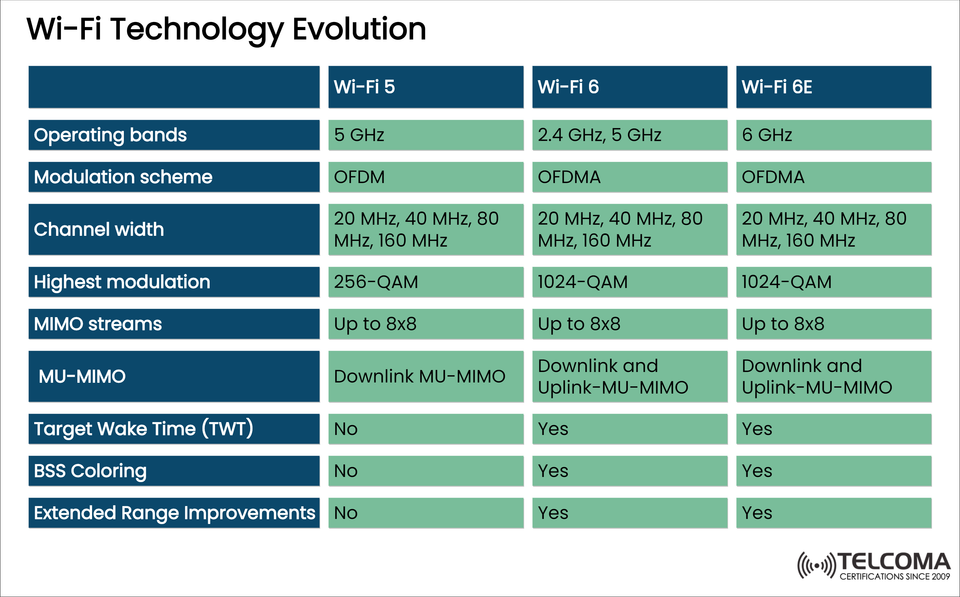
📊 Wi-Fi 5 vs Wi-Fi 6 vs Wi-Fi 6E: Feature Comparison
Feature Wi-Fi 5 Wi-Fi 6 Wi-Fi 6E
Operating Bands 5 GHz 2.4 GHz, 5 GHz 6 GHz
Modulation Scheme OFDM OFDMA OFDMA
Channel Width 20/40/80/160 MHz 20/40/80/160 MHz 20/40/80/160 MHz
Highest Modulation 256-QAM 1024-QAM 1024-QAM
MIMO Streams Up to 8×8 Up to 8×8 Up to 8×8
MU-MIMO Downlink only Downlink + Uplink MU-MIMO Downlink + Uplink MU-MIMO
Target Wake Time (TWT) Not supported Supported Supported
BSS Coloring Not supported Supported Supported
Extended Range Improvements Not supported Supported Supported
🔍 The Key Technologies to Build Wi-Fi:
✅ OFDMA (Orthagonal Frequency Division Multiple Access)
From Wi-Fi 4 → to Wi-Fi 5 containing OFDM, Wi-Fi 6/6E particular use is to accesses multiple users at the same time.
By reducing latency, OFDMA is best suited for IoT along with many possible devices in the same area.
✅ MU-MIMO (Multi-User Larger Input Multiple Output)
Wi-Fi 5 only supports downlink MU-MIMO.
Wi-Fi 6/6E mobility will supports both uplink and downlink MU-MIMO delivering benefits for mobility in edge use cases, both for bidirectional capacity and efficiency.
✅ 1024-QAM Modulation
Wi-Fi 6 and 6E use 1024-QAM offering an enormous step up from the 256-QAM standard in Wi-Fi 5.
Although higher layers would also decrease data rates, this technology will allow higher data rates as we will deliver more bits into every transmission.
✅ Target Wake Time (TWT)
Target wake time is a Wi-Fi 6 feature it supports better battery performance on IoT devices in RF spectrum
According to TWT devices will only wake when they are ready to operate, this also eliminates the power usage of always scanning for a channel to operate on.
✅ BSS (Basic Service Set) Coloring
BSS Coloring will tell devices the difference between the overlapping signals in RF spectrum with multiple close routers.
BSS Coloring will lessen the level of interference while optimizing throughput.
✅ Range Extensions
Wi-Fi 6 and 6E offer better performance even at rang using upgraded beamforming techniques and power control.
🌐 Wi-Fi 6E: The 6GHz Change
The most obvious change with Wi-Fi 6E is access to the 6 GHz band, which means access to three major advancements:
-While not definitive, this band should add at least 1200 MHZ of clean spectrum.
-More 160 megahertz wide channels which is essential for VR, Augmented Reality and 4K video streams.
-Utterly eliminates congestion from interference of any legacy devices we saw with Wi-Fi coverage .
📚 Suggested Reading "Is Wi-Fi 6 at odds with 5G or complementing it?"
"Are You Ready for Wi-Fi 6E into your Enterprise?"
"OFDMA in Wi-Fi 6: Technical Primer"
🛠️ Applications of Wi-Fi 5, 6, and 6E in the Real World
🏢 Enterprise Networks Wi-Fi 6/6E is a godsend for enterprise deployments.
Dense support for devices in office buildings, conference rooms, and campuses.
TWT and MU-MIMO enable lower power consumption, faster reaction times for devices,
🏠 Smart Homes Increased performance in smart TVs, security devices, IoT devices with Wi-fi 6.
Enhanced AR and VR applications (less congested band with higher bandwidth channels) with Wi-Fi 6E.
🏥 Health Care Work Environments Crucial applications (telemetry devices, remote surgery support devices, etc.) can take advantage of the lower latency and better reliability associated with Wi-Fi 6E.
The interference and performance issues that can occur in a whole product line of connected devices can be mitigated by using BSS Coloring to minimize or avoid the co-channel traffic with unintentional interference.
🎮 Gaming and Streaming Ultra-low latency, high throughput (1024-QAM and 160 MHz channel support) are ideal for cloud gaming, streaming content at 4K/8K, and video conferencing.
🧠 Network Engineers Deployment Considerations
📌 Channel Width Planning
80 MHz and 160 MHz channels provide increased available throughput to support active clients, but may also result in interference when used in crowded areas, especially with a Wi-Fi 5 deployment.
The clean 6 GHz band enables multiple 160 MHz channels with little interference and congestion when using Wi-Fi 6E.
📌 Legacy Device Compatibility
Not every legacy device will support Wi-Fi 6 or Wi-Fi 6E.
In mixed band environments, proper management of backward compatibility is required to optimize device performance alongside support for band steering.
📌 Security Updates
Wi-Fi 6 and Wi-Fi 6E designs allow for the full use of WPA3. WPA3 provides promise of better encryption, authentication, and privacy than WPA2.
Help your enterprise move toward NB-IoT connections from WPA2 to WPA3, and on the new concurrent Wireless Architecture!
🔑 SEO Keyword Clusters for This Topic
For professionals writing blogs or product pages, we provide examples of keyword clusters to attract traffic:
Primary Keywords:
Wi-Fi 6E vs Wi-Fi 6, Wi-Fi 6 technology, MU-MIMO explained,6 GHz band with Wi-Fi 6E
Secondary Keywords:
OFDMA in Wi-Fi, what is 1024-QAM, Target Wake Time in Wi-Fi, BSS Coloring use cases
Long-Tail Keywords:
how does Wi-Fi 6 help battery life, Wi-Fi 6 for enterprise networks, Wi-Fi 6E for VR and AR
📈 Final Thoughts: Building Wireless Networks of the Future
Wi-Fi has transitioned from a simple communication protocol to a robust communications platform that provides speed and efficiency amid rapidly increasing demands of today’s digital life.
📌 Recommendations for Practitioners & Decision Makers
📡 For Network Engineers
Take advantage of Wi-Fi 6E’s 6 GHz band to how minimize interference in dense multi-AP environments.
Take advantage of both BSS Coloring and TWT in IoT-heavy and enterprise-heavy deployments to improve efficiency.
🏢 For IT Managers
Evaluate and prioritize Wi-Fi 6/6E capable devices in all refresh cycles.
Turn on WPA3 security protocol on all APs and endpoints.
🧑💼 For Technical Consultants
Encourage adoption of Wi-Fi 6E-ready technology in industries such as hospitals, manufacturing, and education.
🏠 For Enthusiasts
If you are upgrading your home network and frequently stream 4K/8K video content, do gaming over the Internet or use AR/VR applications, upgrade to Wi-Fi 6E routers.